Tulips Frame Mockup: A Designer’s Essential Tool
If you're a designer, marketer, or content creator looking to present your work with flair and professionalism, the Tulips Frame Mockup is an asset that can significantly enhance your visual storytelling. This Photoshop-based mockup set provides a creative and versatile scene for showcasing artwork, brand designs, invitations, and more in high-quality formats tailored for both digital and print media. With smart layers and intuitive design features, it streamlines the process of embedding your graphics into realistic environments, helping you create compelling layouts without starting from scratch.
What Makes Tulips Frame Mockup Unique?
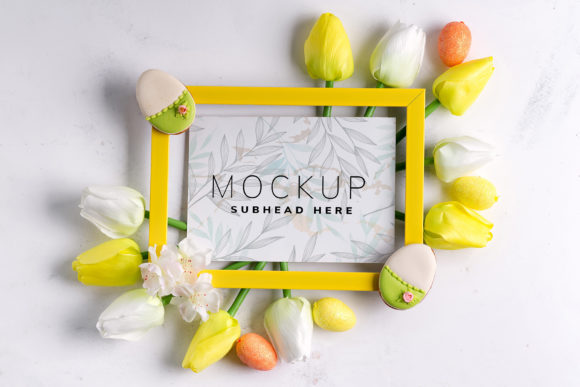
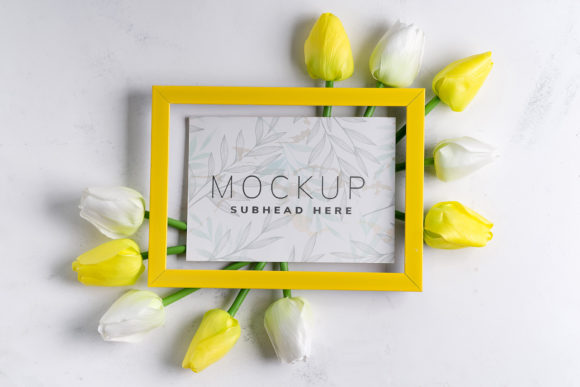
The Tulips Frame Mockup stands out due to its elegant yet practical approach to presentation. It features a clean, modern layout with subtle details that reflect a sense of sophistication and creativity. The mockups are designed to mimic real-world display scenarios—think picture frames, posters, or signage—allowing you to visualize how your design will look when printed or published online.
Each file is built using smart objects, which means you can easily replace the placeholder images with your own designs by simply pasting them into the designated area. The inclusion of a safety zone within each smart object ensures that your artwork stays properly aligned and visible, eliminating common issues like clipping or misplacement. These thoughtful design choices make the mockup not just functional but also reliable for professionals who need consistent results across multiple projects.
A Versatile Scene for Multiple Uses
Whether you're designing for social media, editorial content, or promotional materials, this mockup adapts well to various needs. Its neutral background allows your brand colors and imagery to take center stage without distraction. For example, if you’re launching a new product line or updating your website visuals, the Tulips Frame Mockup gives you a professional canvas to build on. You can use it for:
- Instagram and Facebook posts – Present your designs as if they were part of a gallery or exhibition space.
- Business websites and blogs – Show off your portfolio or client work in a visually engaging format.
- Postcards and invitations – Add a touch of elegance to your printables before sending them out.
- Email campaigns and landing pages – Visualize how your design will appear in different web contexts.
Its adaptability makes it ideal for those working in branding, graphic design, or even hobbyists creating personal projects. Because the files are structured for efficiency, you won’t waste time reworking elements every time you want to try a new concept.
Design Efficiency Meets Professional Quality
One of the standout features of the Tulips Frame Mockup is its integration of smart layers. These allow you to toggle visibility settings, adjust lighting effects, or modify the environment to suit your specific project needs. The smart object security zone adds another layer of convenience by outlining the safe area where your design should be placed, ensuring nothing gets cut off during final output.
This level of detail is especially useful when preparing assets for clients or presenting concepts in pitches. You can quickly insert your logo, poster, or social media graphic into the scene and generate a polished preview that reflects real-world usage. The result? A professional-looking image that communicates your design intent clearly and confidently.
When to Choose This Mockup
While the Tulips Frame Mockup isn't a 3D render or vector-based template, its photo-realistic quality offers a strong illusion of depth and realism. This makes it perfect for designers who want to show their work in context without needing advanced modeling skills. If you're aiming to highlight a brand identity, editorial spread, or packaging design, this mockup helps you do so effectively.
It's particularly well-suited for projects that rely on visual hierarchy and spatial arrangement. The mockup doesn’t alter the background or frame color, giving you full control over the aesthetic. This neutrality is great when you want to focus on the design itself rather than the surrounding elements.
Practical Tips for Getting the Most Out of the Mockup
To use the Tulips Frame Mockup, you'll need basic familiarity with Adobe Photoshop. Once you open the file, locate the smart object layer and double-click to edit the contents. Paste your design inside the frame, resize it to fit the safety zone, and save the file. That’s all it takes to generate a high-quality preview ready for sharing or publishing.
Here are a few best practices to consider:
- Evaluate your design’s dimensions before inserting it into the smart object to ensure it fits neatly within the frame.
- Test font pairings if your design includes text. Use this mockup to see how your typography interacts with the overall composition.
- Review included styles to understand the variety of layouts available. Some may be better suited for logos, while others work well for editorial spreads.
- Check readability in the final mockup view. Sometimes, contrast between your design and the frame can affect legibility, so it's important to review the output at actual size.
- Ensure commercial compliance by verifying the licensing terms associated with the mockup. Many such assets are free for personal use but require a license for business applications.
Real-World Applications and Examples
Imagine you’re a small business owner launching a new product. You’ve created beautiful packaging designs but need to show them off in a way that feels authentic and trustworthy. By placing your package mockups into the Tulips Frame Mockup, you can present them as if they were displayed in a boutique or art gallery, instantly elevating their perceived value.
Or consider a blogger curating a design resource round-up. Using this mockup, you can showcase each tool or font in a cohesive visual style, making the post feel more professional and easier to navigate. Similarly, marketers preparing campaign assets can use it to test variations of a single design across different platforms, ensuring consistency and clarity.
For graphic designers working with clients, the ability to show how a logo might appear in various physical or digital contexts is invaluable. The Tulips Frame Mockup gives you a realistic backdrop to demonstrate your creative solutions, building trust and facilitating decision-making.
Readability and Brand Perception Considerations
Though the mockup focuses on layout and presentation, it indirectly supports readability and brand perception by emphasizing clean, uncluttered design spaces. When used alongside a premium font or a carefully chosen typeface, the mockup can help reinforce your brand identity. Think of it as a complementary element in your design toolkit—one that enhances the impact of your other creative decisions.
By using this mockup consistently across your marketing materials, you establish a unified visual language that contributes to brand recognition. Whether it's for a blog header, social media post, or printed collateral, having a familiar framework helps maintain professionalism and strengthens your audience's connection to your brand.
Final Thoughts on Integration and Workflow
Incorporating the Tulips Frame Mockup into your workflow can boost productivity while maintaining high design standards. It’s not just about speed—it’s about delivering results that look intentional and refined. As a creative font enthusiast or someone focused on logo design, you’ll appreciate how this tool simplifies the process of visualizing your ideas in real-world settings.
Remember, the goal is to use the mockup as a foundation—not a limitation. Customize the lighting, add textures, or experiment with overlays to match your brand’s tone and personality. And always keep your audience in mind when choosing which version of the mockup to use. Will it resonate more in a digital setting? Or does a print-style layout better align with your message?
With the right approach, the Tulips Frame Mockup becomes more than just a design asset; it becomes a strategic tool that helps you communicate your vision clearly and professionally. So next time you're prepping a portfolio piece or planning a social media launch, give it a try—you might find it's exactly what you need to bring your designs to life.