Procreate 3D Model - Right Arm Female: A Versatile Tool for Digital Artists
In the ever-evolving world of digital art, having access to high-quality tools can make all the difference. One such tool gaining popularity among artists and designers is the Procreate 3D Model - Right Arm Female, part of the broader Procreate 3D Model Pack - Right Arm Female. This resource offers creators a unique way to blend 2D illustration with 3D modeling in Procreate, enabling them to work more intuitively and efficiently. Whether you're a professional illustrator, a hobbyist artist, or someone exploring digital design for the first time, understanding how these models function and where they fit into your workflow can help you unlock new creative possibilities.
What's Included in the Procreate 3D Model Pack?
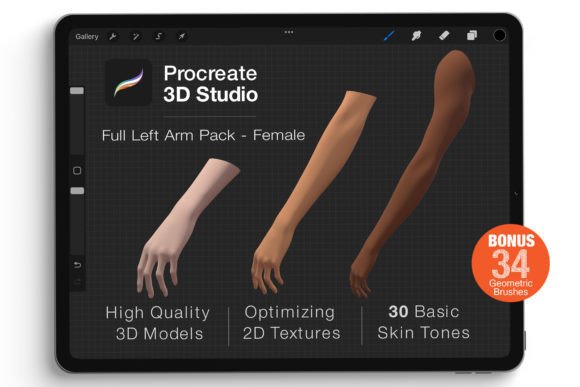
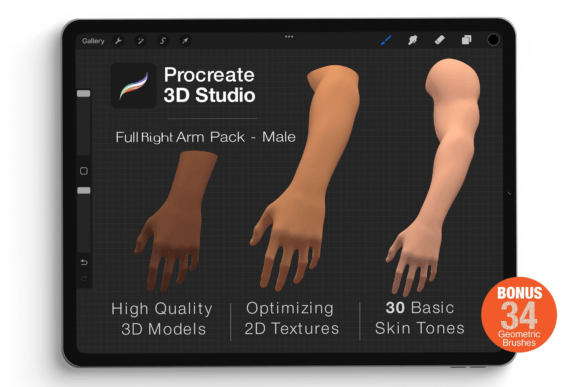
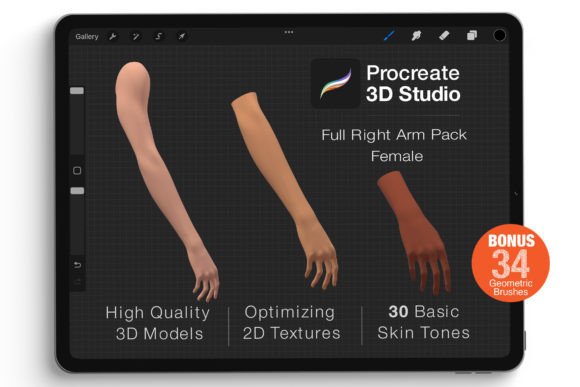
The Procreate 3D Model Pack - Right Arm Female contains three distinct models, each tailored for different artistic needs. These models come in .USDZ format, which is compatible with Apple’s Reality Composer and other platforms that support Universal Scene Description (USD). The pack also includes a set of geometric brushes, specifically optimized for use with the models. These brushes allow for seamless integration between 2D texture painting and 3D surfaces, giving users more control over their designs.
- Three Procreate 3D Models: Each model provides a realistic representation of a right female arm, ideal for concept art, fashion illustrations, anatomical studies, and character design.
- .USDZ Files: These files are lightweight and optimized for performance, ensuring smooth operation even on less powerful devices.
- Geometric Brushes: Designed for texture application, these brushes enhance the ability to paint directly onto the 3D model surface.
Purpose and Features of the Procreate 3D Model - Right Arm Female
The primary purpose of the Procreate 3D Model - Right Arm Female is to serve as a canvas for digital artists who want to create realistic or stylized artwork that interacts with a 3D space. Unlike traditional 2D drawing, this model allows you to rotate it freely, view it from multiple angles, and apply textures or colors directly onto its surface. This level of interactivity makes it especially useful for those working in industries like fashion, gaming, animation, or even medical visualization.
Key features include:
- High-Quality 3D Geometry: The model is detailed enough to capture subtle anatomical features while remaining efficient for real-time rendering.
- Optimized 2D Texture Mapping: You can easily re-color the model, add tattoos, patterns, or custom textures using Procreate's intuitive brush engine.
- Easy Customization Interface: Thanks to the optimization of the 2D texture system, artists can focus more on creativity than technical setup.
- True 3D Space Integration: You can manipulate the model in real time—rotating, zooming, and adjusting viewpoints within Procreate itself.
Who Can Benefit from Using This 3D Model?
This model is particularly valuable for a range of users, including:
- Digital Artists: Those looking to expand their skills into 3D illustration without switching software.
- Fashion Designers: Who need to visualize clothing or accessories on a human form quickly and accurately.
- Game Developers: Seeking to prototype characters or assets before full 3D sculpting in dedicated software.
- Medical Illustrators: Requiring accurate anatomical references for educational materials or visual aids.
- Students and Educators: Exploring 3D anatomy, design, or illustration in an accessible environment.
Its ease of use and compatibility with Procreate make it a great entry point for anyone interested in merging 2D and 3D workflows.
Real-World Applications and Use Cases
The versatility of the Procreate 3D Model - Right Arm Female opens the door to various practical applications. Here are a few examples of how professionals and enthusiasts might use it:
Character Concept Art
When designing characters for games or animations, artists often start with sketches before moving to 3D modeling. With the Procreate 3D model, they can draw directly onto the arm model to see how color schemes, patterns, or armor pieces look from every angle. This saves time and reduces the back-and-forth between 2D and 3D environments.
Fashion and Apparel Visualization
Fashion illustrators can use the model to drape virtual fabric or sketch out intricate costume details. Since the model supports texture overlays, it becomes easier to test how different materials or prints will appear on the arm, providing a realistic preview before finalizing the design.
Medical and Anatomical Studies
For those creating educational content or studying anatomy, the model serves as a simplified but effective reference. It allows for the highlighting of muscles, bones, or skin layers through color and texture mapping, making complex structures more understandable.
Prototyping Accessories and Jewelry
Designers working on jewelry, watches, or wearable tech can use the model to showcase their products on a lifelike arm. This helps in evaluating proportions, placement, and aesthetic appeal without needing advanced 3D modeling knowledge.
Strengths and Limitations to Consider
While the Procreate 3D Model - Right Arm Female is a powerful tool, it's important to understand both its strengths and limitations to determine if it fits your project requirements.
Strengths
- User-Friendly Interface: No prior experience with 3D modeling software is required—just familiarity with Procreate.
- Speed and Efficiency: The optimized .USDZ format ensures fast loading and responsive performance.
- Flexibility in Customization: From simple recoloring to adding complex patterns, the model adapts well to diverse creative needs.
- Integration with AR Platforms: The .USDZ format allows for easy export and use in augmented reality experiences, expanding the model’s utility beyond static illustrations.
Limitations and Practical Expectations
- Not for Rigged Animation: While great for static visuals, the model isn't suitable for animated characters or complex rigging tasks.
- Device Compatibility: As it relies on .USDZ format, it works best on Apple devices that support this technology.
- Learning Curve for 3D Workflow: Though user-friendly, working in 3D may take some time to adjust for those used to strictly 2D methods.
- Limited Surface Detail: While high quality, the model may not provide the ultra-detailed resolution needed for photorealistic renderings without additional post-processing.
How to Get Started with the Procreate 3D Model - Right Arm Female
If you’re considering integrating the Procreate 3D Model - Right Arm Female into your projects, here’s a quick guide to help you begin:
- Import the Model: Open Procreate and import the .USDZ file by selecting the “+” button and choosing “Import Image.”
- Adjust Viewpoints: Use the gesture controls to rotate and position the model to your desired angle.
- Paint Directly on the Model: Select the geometric brushes included in the pack and start applying color, shading, or patterns.
- Export and Share: Once satisfied, export your design in standard image formats or keep the model in .USDZ for further use in AR applications.
Experimenting with the model can be a fun and engaging process. Many artists find that the tactile nature of Procreate’s interface makes it feel more natural to work with 3D objects than using traditional mesh editors.
Evaluating Suitability for Your Projects
Before deciding to use the Procreate 3D Model - Right Arm Female, consider the following questions:
- Do I need a high-resolution, rotatable model for concept art or design visualization?
- Am I comfortable working in a semi-3D environment, or do I require full 3D sculpting capabilities?
- Will I benefit from being able to apply textures and colors directly on a 3D model without leaving my current software?
- Is my target platform or device compatible with .USDZ files?
If most of your answers lean toward "yes," then this model could be a valuable addition to your toolkit. However, if your project requires complex rigging, animation, or extremely detailed modeling, you may want to pair this with more robust 3D software later in the pipeline.
Why Choose This Model Over Others?
Compared to many other 3D asset packs available for digital artists, the Procreate 3D Model - Right Arm Female stands out for several reasons:
- Native Support in Procreate: It doesn’t require third-party plugins or complicated setups, unlike many 3D modeling tools.
- Brush Optimization: The geometric brushes included in the pack are tailored for texture application, ensuring smoother results and faster workflows.
- Focus on Specificity: By concentrating on just the right arm, the model allows for deeper exploration and customization of that area without unnecessary complexity.
- Accessibility: It brings 3D modeling elements into a familiar 2D illustration platform, lowering the barrier to entry for beginners.
These advantages make it a strong candidate for artists who want to experiment with 3D without fully committing to a new software ecosystem.
Final Thoughts and Recommendations
The Procreate 3D Model - Right Arm Female is a compelling option for anyone looking to bridge the gap between 2D and 3D art creation. Its realistic geometry, combined with the flexibility of Procreate’s tools, gives users a fresh perspective on how they approach digital illustration. However, it's essential to recognize its place within the larger context of 3D design tools. Think of it as a stepping stone rather than a complete solution—it excels at early-stage prototyping and concept development but may not replace more specialized software for end-to-end production.
Ultimately, whether you're a seasoned designer or just starting out, the Procreate 3D Model Pack - Right Arm Female offers a practical and creative way to explore new dimensions in your art. If you're curious about how to integrate 3D elements into your workflow without investing in heavy software, give it a try. You might find it opens up a whole new world of expression and efficiency in your digital projects.